iPhone · Built on Apple Screen Time
A smarter pause
A smarter pause
before apps open.
Brain Unlock protects the apps you choose with Apple Screen Time, then opens access after a short thinking check or puzzle — and quietly locks them again when the time is up.
Coming soon to the App Store. “Request beta” opens your mail app with a quick note ready to send — no forms, no tracking.
- Apple Screen Time
- Local-first
- No ads
- No tracking
Thinking Check
2 / 5
Math
Multiply
Question
What is 7 × 8?
How it works
Protect. Solve. Open. Relock.
Set it up once. After that, every app you guarded asks for a moment of thinking before it opens — and locks itself back up when your time's up.
-
01
Protect apps
Pick individual apps or whole categories with Apple's Screen Time picker.
-
02
Solve a challenge
A short thinking check or puzzle stands between the tap and the app. 30 seconds, not 30 minutes.
-
03
Access opens
Clear it, and your apps open — for exactly as long as you decided.
-
04
Protection returns
When your time's up, the shields come back on their own. No willpower required.
The challenges
Useful friction — not busywork.
Four kinds of quick challenge. Mix them, dial the difficulty — the pause never goes stale.
Thinking Check
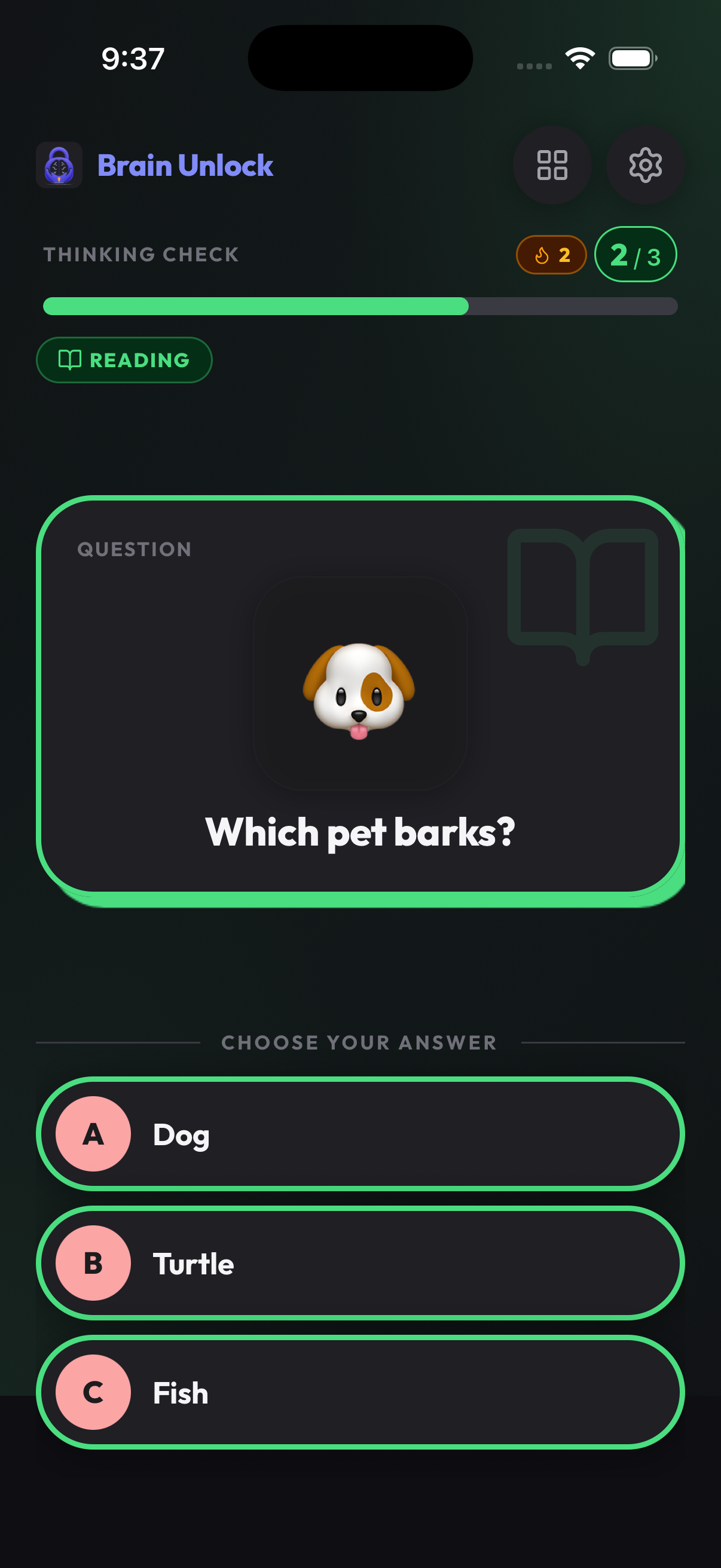
Math, reading, logic and critical-thinking prompts. 1,000+ questions, difficulty you control.
Pattern
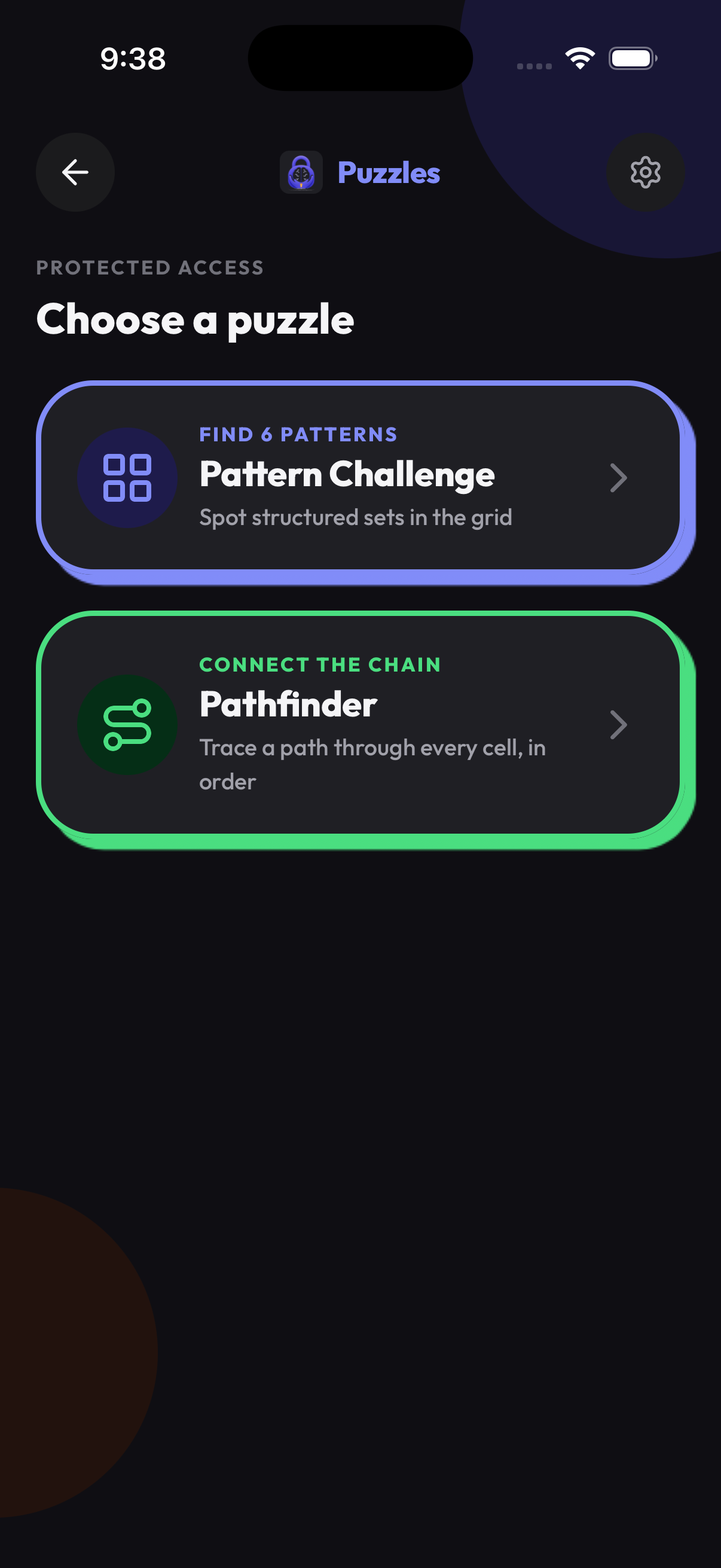
Spot the set that matches by shape, color, fill and count. Pure visual logic.
Pathfinder
Trace one path that fills the grid and hits the numbers in order. Planning, not luck.
Memory Burst
Watch the tiles light up, then tap them back in order. It grows every round.
Inside the app
The pause, up close.
Real screens from Brain Unlock — a quick Thinking Check, or your pick of puzzle. Short enough to respect the moment, sharp enough to be worth it.
Why it works
Why a pause beats a block.
Hard blockers just make you resent them — so you delete them by Tuesday. Brain Unlock trades one mindless tap for one quick win, then lets you in. Nothing to grind, nothing to game.
- Replaces the reflex. One challenge breaks the autopilot tap before a protected app opens.
- Builds real skills. Recall, logic, reading and problem-solving — woven into everyday unlocking.
- Access on your terms. Set how many challenges to clear and how long access stays open.
- No gamification trap. Friction stays purposeful and short — it never becomes the thing you do.
Who it is for
For anyone who's opened an app and forgotten why.
Not a game. Not another screen-time dashboard. Just one quick lock-and-learn step in front of the apps that pull you in.
Privacy & trust
Built for iPhone, built to stay quiet.
Brain Unlock is local-first. The things that make it work live on your device — not on our servers.
- No accounts, no sign-in
- No ads, ever
- No cross-app tracking or ad identifiers
- Challenge summaries & settings stay on device
- Apple Screen Time tokens used only to shield apps
- RevenueCat only checks your subscription status
Questions before you install
Clear answers, no mystery box.
Screen Time apps ask for trust. These are the details most people want before trying Brain Unlock.
Does Brain Unlock replace Apple Screen Time?
No. Brain Unlock uses Apple Screen Time and FamilyControls APIs to shield selected apps, then temporarily open access after a challenge.
Can Brain Unlock see my full Screen Time history?
No. The app stores the selected app/category token needed to operate shielding. It does not receive a full Screen Time history.
Is this meant to be a game?
No. The challenges are intentionally short. They add useful friction before access, but are not designed as an endless game loop.
What happens when the timer ends?
Protection returns automatically. If iOS behavior varies while an app is already open, shields still apply for relaunch/re-entry.
Does it require an account?
No account is required in the current version. Settings, challenge summaries, and access state are local-first.
How do I try it?
Brain Unlock is preparing for App Store release. Use the beta request link to ask about TestFlight access.
Make the first tap count.
Coming soon to the App Store. Want in early?